Find the fan that has stopped
- If the outdoor condenser fan stays still while cooling is running, switch the thermostat Off immediately. Running without that fan can overheat the compressor.
- If the compressor is running with the fan stopped, turn off the AC breaker too. Keep cooling off while you check what you can see from outside.
- Check the cooling setting and power controls, then the filter and visible blades. A humming unit, damaged blade or breaker that trips again needs an HVAC professional.
Air coming through a vent tells you the indoor blower is moving; it doesn’t tell you whether the separate fan outside is running. We’d check for an actual cooling request before naming a failed part, because a thermostat set to Heat or a schedule that has turned cooling off can leave the outdoor unit still. If cooling is calling and the outdoor blade remains motionless, leave cooling off while you sort the clues.
On a split-system AC, the outdoor condenser fan is visible through the top grille. It moves air across the condenser coil to release heat outside. Look at that fan from outside the cabinet, and keep the indoor blower separate in your notes: one can run while the other is stopped.
Check whether cooling is being requested
Read the thermostat display before changing anything else. For a cooling request, set it to Cool and choose a temperature below the current room temperature. If it was set to Heat, or the chosen temperature wasn’t below the room temperature, correct that setting and watch the outdoor fan from outside the unit.
If you have a programmable thermostat, check its schedule for a period that turns cooling off. A blank thermostat screen can also be a clue that the system has a power problem. Make a note of what the display shows, since that helps separate a missing cooling request from an outdoor unit that fails during one.
Some thermostats use Auto mode, in which the fan may not run constantly. What matters for this check is whether the system is set to request cooling at the room’s current temperature. If the outdoor fan remains still during that request, switch cooling Off and continue with the external power checks.
The whole outdoor unit is silent
When you hear nothing from outside and see no fan movement, check the AC breaker in the main electrical panel. An interrupted power supply can leave the whole outdoor unit silent. If the breaker is tripped, reset it once and observe whether the outdoor unit and fan run when cooling is requested.
If that breaker trips again, leave it Off and contact an HVAC professional. Don’t force another reset: a repeat trip points to an electrical problem that needs service.
Also check the accessible outdoor disconnect near the unit and the equipment switch at the indoor furnace or air handler. Each should be On for the system to operate. If restoring a switch brings the outdoor unit back, look for visible fan rotation during a cooling request; if the unit remains silent, leave cooling Off and report which controls you checked.
A dirty filter can shut cooling down
Check the indoor air filter before treating a stopped system as an outdoor motor failure. A severely clogged filter restricts airflow and can cause an AC system to overheat and shut down. If the filter is dirty, replace it and keep the old filter’s condition in mind when you describe the problem.
A filter change can solve a shutdown caused by restricted airflow. After replacing it, check whether the outdoor fan visibly runs during a cooling request. If the blade remains still, turn cooling Off and continue with a power-off look at the outdoor unit; the filter result gives you a useful clue without identifying an electrical part.
What you can see through the grille
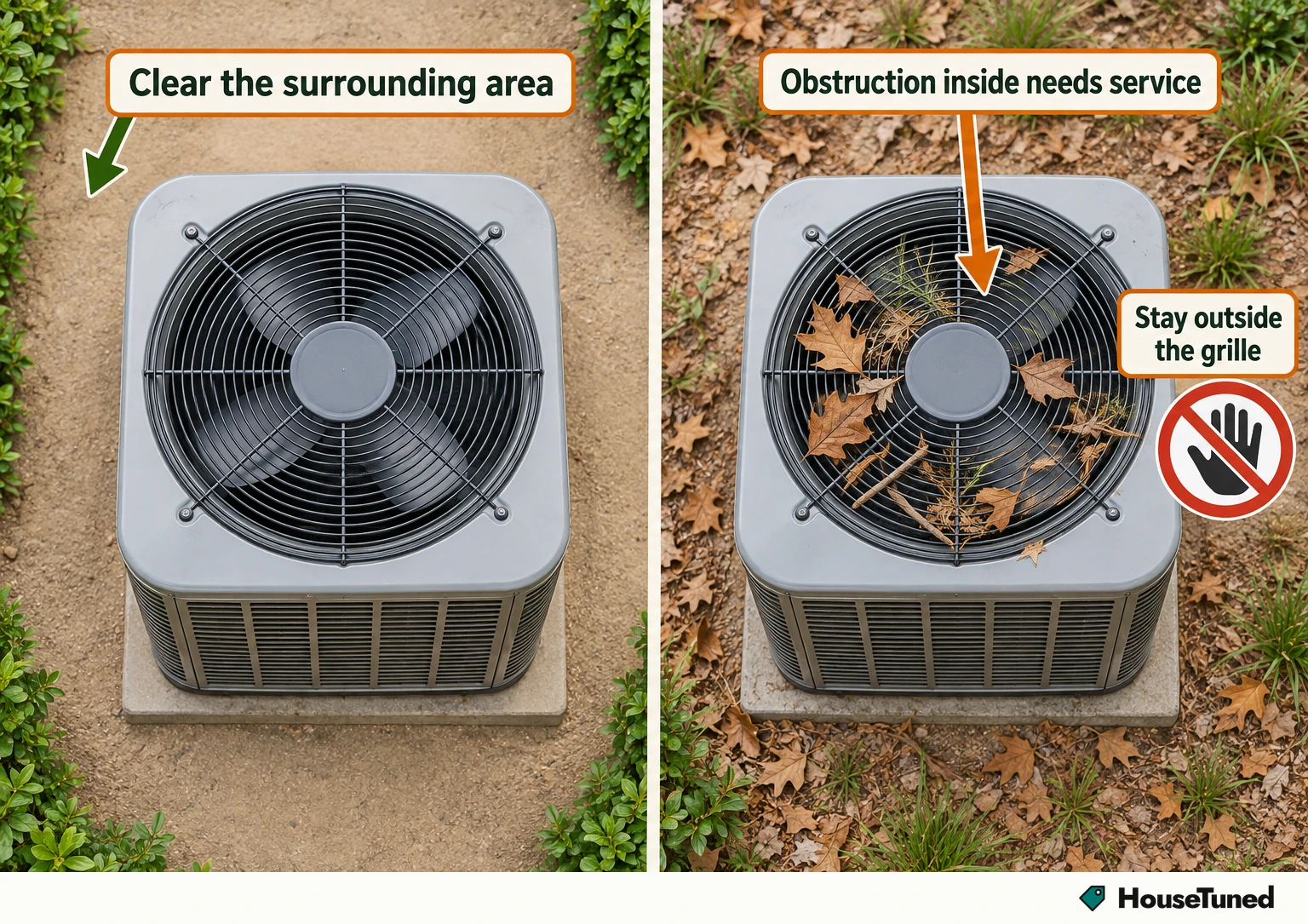
Turn the thermostat Off and shut down the unit before looking through the top grille. Check whether the blades appear intact, cracked or loose, and whether anything visible is blocking them. A damaged blade can strike other components or damage the motor or coils, so keep the system off and contact an HVAC professional if you see damage.
Leaves, twigs, dirt and vegetation can obstruct the outdoor unit. Clear debris and growth around the cabinet while it’s off, staying outside the grille. If an obstruction is inside the unit, leave it off and have an HVAC professional clear it.
An unusual scraping or striking sound can go with a broken blade. Grinding or screeching before the fan stops can also point toward a motor problem. Record what you heard and what you could see through the grille, then leave the unit off if the blade is damaged or blocked inside.
The cabinet hums but the blade is still
A humming outdoor unit with motionless blades makes the run capacitor a likely suspect. A failing fan motor can produce that same humming symptom, while a failed contactor can buzz or keep the outdoor unit from starting. A hum alone doesn’t identify which part has failed; an HVAC technician needs to diagnose the electrical components.
A fan that runs slowly, starts and stops, or makes a buzzing sound can also be showing motor trouble. Tell the technician whether the cabinet was silent or humming, whether the blades moved at all, and whether the sound changed before the fan stopped. Those observations are more useful than choosing a replacement part from the noise.
The remaining parts need electrical diagnosis
Once the thermostat, accessible power controls, filter and outside view have been checked, a fan that still won’t run needs professional diagnosis. Capacitors can retain a dangerous electrical charge even after the system is turned off. Leave panel removal, capacitor handling or replacement, electrical testing and fan-motor repair to a trained HVAC professional.
The motor uses high-voltage power and model-specific wiring, and a contactor can interrupt current to the fan. Don’t disassemble the cabinet or test energized parts. When you book the visit, describe the thermostat setting, breaker behavior, outdoor sound, blade condition and whether the indoor vents were moving air.
Check the result from outside
After correcting a thermostat setting or accessible power switch, or replacing a dirty filter, check the result from outside the cabinet. During a cooling request, you should be able to see the outdoor condenser fan turning through the top grille while the indoor blower sends cool air through the vents.
Keep the area around the outdoor unit clear of leaves, twigs and vegetation so they don’t obstruct the fan. If the fan remains still during cooling, turn the system Off as above and use the observations you’ve gathered for the service visit.
More in this category