The signal decides when food goes in
- Choose the oven setting your recipe needs, set the temperature and let the oven heat with the door closed.
- For 350°F, Whirlpool gives about 10–15 minutes; KitchenAid gives about 12–15 minutes.
- On some GE ovens, the preheat signal means most food can go in before the oven reaches the set temperature.
If you're waiting with a pan ready, we'd check what your oven's preheat signal means before adding extra waiting time. GE describes two different signals, including one that deliberately sounds early, so the useful question is when your model is ready for food.
Keep the target temperature and the loading signal separate in your mind. The first is the temperature you've selected for cooking; the second is your oven's cue about when to put food inside, and GE's examples show why those moments can differ.
Choose the setting and temperature
Use your recipe's required setting and temperature as your starting point. Whirlpool's basic preheating instructions (opens in a new tab) describe choosing a setting such as Bake or Broil, adjusting the temperature with the controls, then allowing time for the oven to heat.
For a recipe calling for baking at 350°F, that means choosing Bake and setting 350°F. The mode and temperature are separate choices: selecting a cooking mode is part of the setup, and entering the recipe's temperature completes that choice.
Follow your owner's manual for the exact controls that begin heating on your oven. That gives you the button or dial sequence for your appliance, including any confirmation it requires after you've chosen the setting.
While it heats, avoid opening the door, because that lets heat escape. Leave the door closed through the waiting period instead of opening it to check on progress.
How long to allow at 350°F or higher
Plan your wait around the target temperature and your model. Whirlpool's general estimate is about 10–15 minutes to reach 350°F, while KitchenAid gives about 12–15 minutes for 350°F with all racks in the oven.
Those estimates overlap, but they aren't identical. Keep the maker's guidance attached to its estimate: KitchenAid's narrower range describes its guidance, while Whirlpool offers a broader general planning range and explicitly says preheat time varies by model.
For a hotter recipe, Whirlpool gives about 15–20 minutes for 400–450°F or above (opens in a new tab). It also offers a rough rule of about five additional minutes for each 100 degrees above 350°F.
Use those figures to allow time before cooking, with your own oven's instructions governing the actual preheat procedure. The words “about” and “typically” matter here: these are approximate waiting times, and the selected temperature is only one part of what determines the wait.
Why one oven takes longer than another
A different oven can have a different warm-up time even when you're choosing the same temperature. KitchenAid identifies several reasons for longer preheating (opens in a new tab), including oven design, installation voltage and the temperature of the room.
KitchenAid explains that newer ranges and ovens have larger cavities than past models, which may take longer to preheat. If you're comparing a newer oven with a previous one, cavity size is one of the differences its guidance points to.
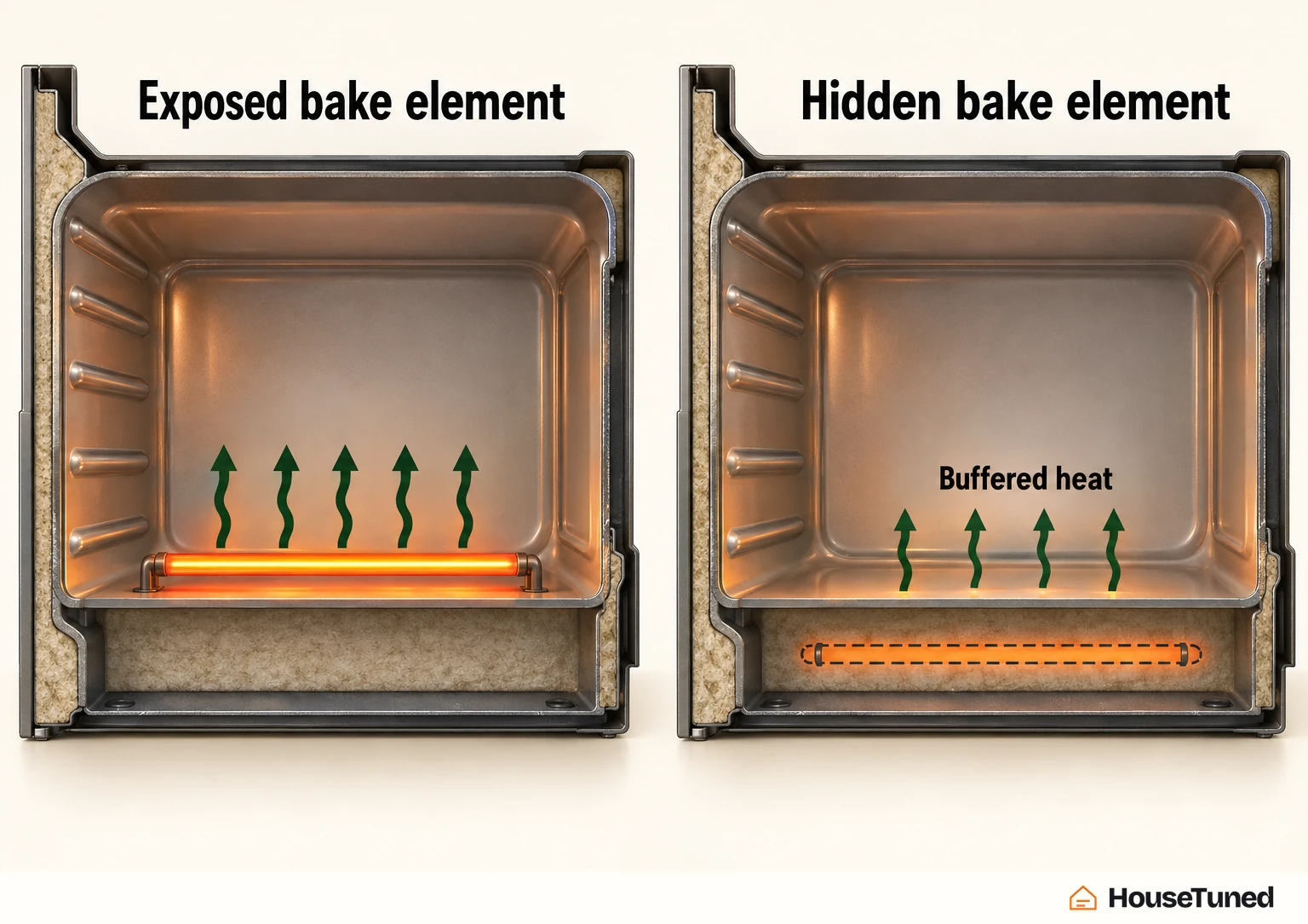
It also distinguishes hidden and exposed bake elements. A hidden bake element supplies buffered heat and takes longer to preheat than an exposed element, so the element arrangement changes the warm-up expectation.
For installation voltage, KitchenAid says an oven on 208V takes longer to preheat than one on 240V. Its qualification matters just as much as the timing difference: once the set temperature is reached, oven performance isn't affected.
A cold room adds another influence. KitchenAid lists low room temperature as a reason preheating takes longer, so the surrounding kitchen conditions belong alongside the oven's design when you're thinking about the wait.
GE's example of a signal before full temperature
For a worked example, GE Appliances Range & Wall Oven guidance separates preheat signals into two types. GE's explanation of preheat indicators (opens in a new tab) covers both lights and audible signals, with different meanings across models.
One type signals when the oven reaches the set temperature. GE says this is found most often on models with a preheat indicator light, but some models use a tone or beep for the same purpose; preheating takes about 10–20 minutes, depending on the model.
The other type signals when the oven is hot enough to add most food that needs preheating. On many newer GE models with an audible signal, that happens after about 7–12 minutes, while the oven is still below the set temperature.
That early signal is a loading cue. GE explicitly permits adding most food requiring a preheated oven at that point, so an early beep can be part of the oven's intended operation.
The sound alone doesn't identify which signal type you have, because GE uses audible signals for both behaviors; check your model's preheating instructions to interpret yours. If your GE model has neither a preheat indicator light nor an audible signal, GE advises waiting about 10–20 minutes, with the time varying by model.
When preheating matters most
What you're cooking helps explain why the wait matters. GE emphasizes preheating (opens in a new tab) when baking above 275 degrees and for foods with short cooking times, including cakes, cookies, biscuits and other pastries.
For most meats, poultry and casseroles, or when roasting or cooking complete meals, GE says preheating usually isn't needed, although it's often recommended. That distinction keeps its advice tied to the food: its guidance for a batch of cookies differs from its guidance for a complete meal.
GE also explains that the Bake and Broil elements come on during preheating to heat the interior quickly. Those elements are doing the warm-up work within the preheat process.
Put food in promptly at the KitchenAid tone
For KitchenAid ovens, the manufacturer's instruction is to load food when the preheat tone sounds for the best cooking results. Its loading guidance (opens in a new tab) makes the tone the point to act, alongside its approximate timing estimate.
Have your food ready to go in as soon after that signal as possible. Avoid leaving the door open for an extended period while loading, so you preserve the heat you've just waited for and follow KitchenAid's guidance for optimal performance.
More in this category