Choose the check that fits your code
- Match your exact code before choosing a check or reset. GE's next action depends on the code.
- A number followed by H means Delay Start. PF means power was interrupted.
- For a leak indication, follow the service branch below.
When the controls respond but the wash won't begin, the cause could be a delay setting, a power interruption or a fault. We'd identify the code first, because those situations need different actions and a leak indication calls for service.
These are common GE code meanings, with a model limit that matters before you try anything. GE's US code guidance (opens in a new tab) says that not every code appears on every model, so use the entry that matches your machine and its features.
For water problems, the visible checks have a purpose: a clog in the drain system can keep water from leaving, and a stuck flood float can keep the dishwasher from filling. Those possibilities explain the drain and float checks below. Temperature-sensor faults and leak indications have separate recovery or service instructions.
A delay or power interruption
If you see a number followed by H, such as 1H, the dishwasher is in Delay Start mode. Keep that entry separate from C1 when looking up the message: the H entry describes the delay setting, while C1 concerns the time spent draining.
PF means the dishwasher has experienced a power failure. Select the cycle and options you want, then press Start. GE says the dishwasher will function normally after that selection, so look for normal operation as the outcome of this recovery.
Water won't drain with C1, C2, C3 or FTD
C1 means pumping water out during the drain has taken more than 2 minutes. Its checks focus on the route water takes out of the dishwasher, which puts the air gap, hose and disposer ahead of any internal repair.
For C1, clean the air gap and run the disposer to clear it out. GE's C1 guidance (opens in a new tab) also calls for repositioning or replacing the hose as needed. Leave hose replacement to an appliance technician, and contact service if the drain problem persists.
C2 means the total pump-out cycle has exceeded 7 minutes. Press RESET to stop the beep. The result to listen for is a quiet alert; this button action silences the notification rather than verifying a drainage repair.
C3 means the dishwasher won't drain and has a breaker recovery described in the final section. FTD or F56 also means failure to drain, but its prescribed checks are the drain hose, air gap and disposer. Match the code to its action even when the visible symptom looks the same.
C4 and C5 lead to float and water checks
C4 has several possible explanations: the machine filled twice after a power failure, the float switch is stuck or has failed, or the drain or sump is clogged. Its checks address the controls, float and debris in the tub.
For C4, touch Start, then Cancel/Reset. Tap the float cover to free a stuck float. Look for the plastic piece shaped like an upside-down cup at the front-left corner of the dishwasher floor.
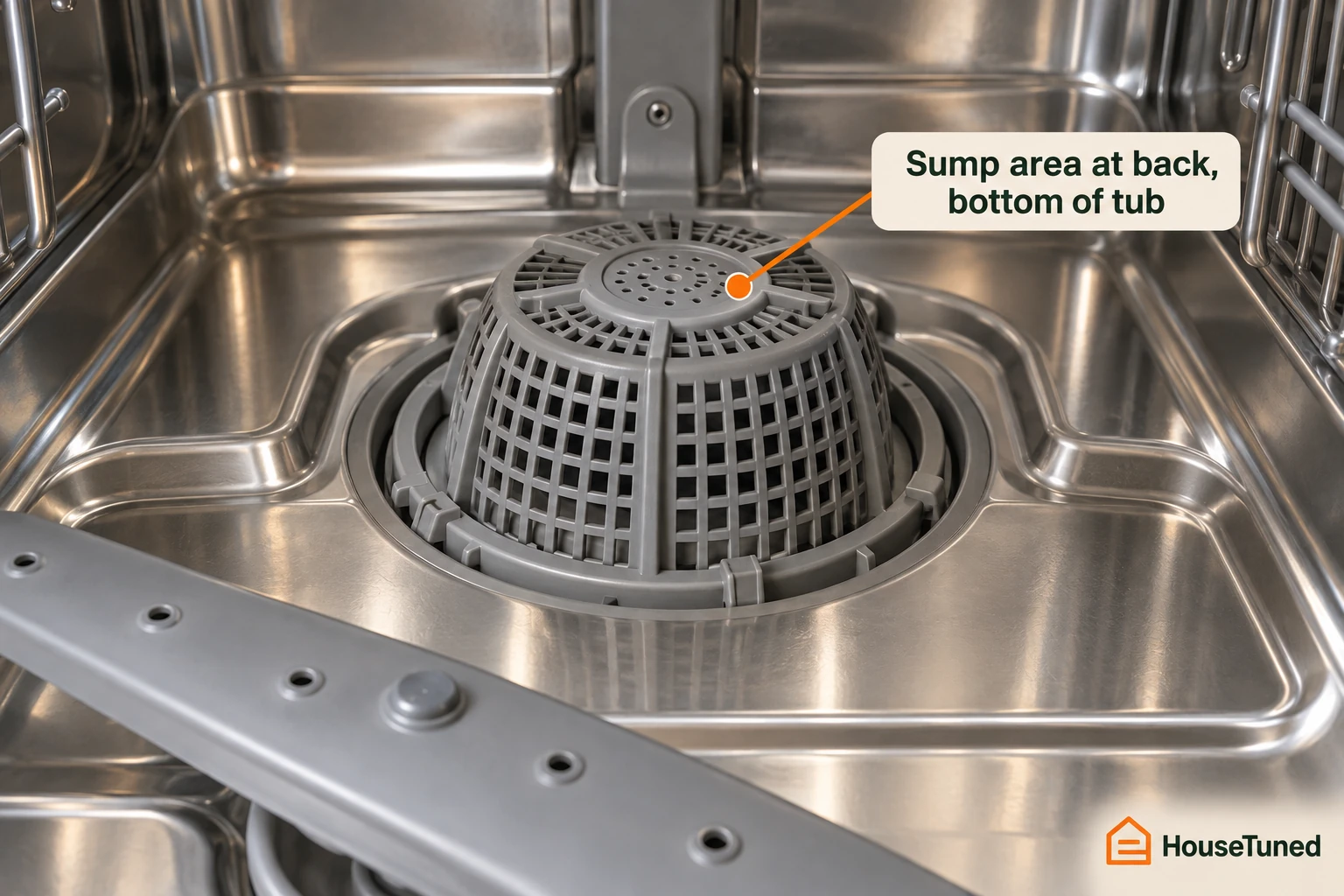
Also check the sump at the back, bottom of the tub for debris. It looks like an upside-down silverware basket and can become clogged. If the C4 problem persists after these checks, contact service.
C5 means the pump-out time is too short. Make sure the water supply is turned on, then try the same cycle again. C5 also calls for the float-cover check described above, to free a float that's stuck.
H2O depends on the wash cycle
H2O indicates a low-water situation. Check which wash cycle was running before choosing the next action, because GE's H2O instructions (opens in a new tab) give different directions for 1-Hour Wash and the other named cycles.
If H2O appears only during 1-Hour Wash, schedule service. In that specific situation, GE permits you to use any other cycle while you're waiting for service.
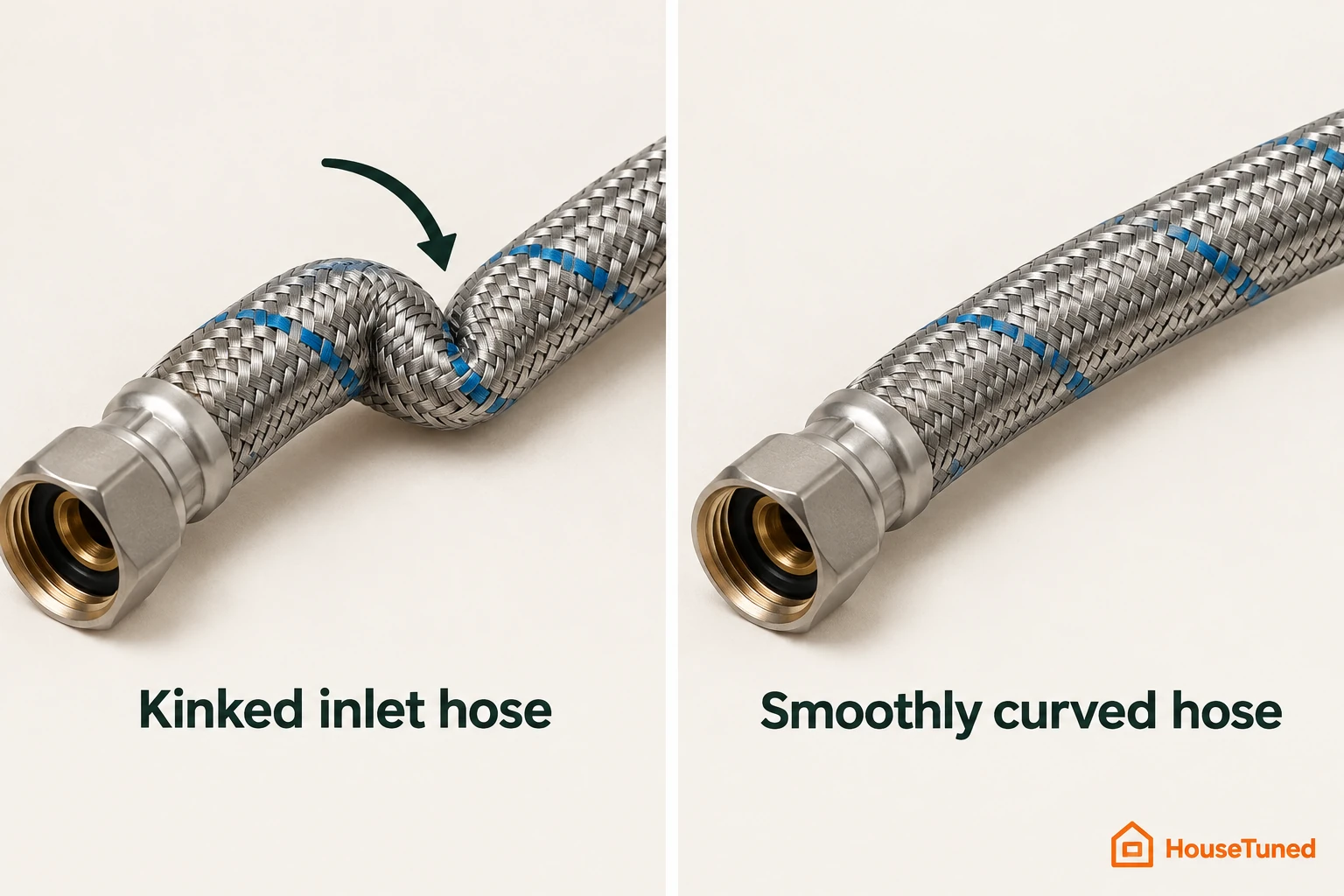
If H2O appears during AutoSense, Heavy, Normal or Light, double-check the inlet water hose for a kink. If neither cycle situation applies, call for service. The permission to use another cycle belongs specifically to the 1-Hour-Wash-only branch.
C6 and C7 separate cold water from a sensor fault
C6 means the water temperature is too low. The incoming water should be at least 120°F, so begin with the hot-water supply conditions.
Before starting the dishwasher, run the adjacent faucet to purge cold water from the line. Don't run the washing machine or take showers while the dishwasher is operating. Keep that restriction with the faucet check as part of GE's C6 hot-water guidance (opens in a new tab).
GE recommends adjusting the water-heater temperature and using dishwasher options that extend the run and add heat. The incoming-water target and the extra heat from a longer run are the two temperature measures in that guidance.
C7 means the water-temperature sensor circuit has become inoperative. Use the C7 breaker recovery in the final section. For this code, the next decision is whether the sensor problem persists after recovery.
C8 and Cup Open need different cup checks
C8 points to something blocking the detergent cup from opening fully. Look for an obstruction such as silverware or a pan, and move it out of the cup's way.
Close and latch the dishwasher door, then wait 30 seconds for the cup to open. Keep the door latched during that wait, as directed by GE's C8 procedure (opens in a new tab). Cup opening is the result you're looking for.
Cup Open means the detergent cup hasn't been closed. It's a reminder to add detergent and latch the cup shut. When this problem occurs, the cycle won't start.
You can override Cup Open by pressing Start again without opening the door. If the problem persists, contact service.
Leak messages, 999 and PrS
LEAK DETECTED means a possible leak has been detected. On models with leak detection, the cycle will be cancelled. Contact service for this message.
For 999, check whether your model has Floor Protect with Alert. With that feature, 999 means a possible leak, the dishwasher won't start, and you should contact service. On other models, 999 means the control needs to be reset, so the feature distinction changes the meaning.
PrS means the pressure sensor is sending an invalid signal to the control. The cycle either can't start or will cancel. GE identifies a harness or sensor issue as the most likely explanation and recommends service, so contact an appliance repair technician for this branch.
Power recovery and model-specific help
For C3 or C7, disconnect power at the circuit breaker for about 30 seconds, then restore power to reset the dishwasher. If the applicable drain or sensor problem persists, contact service. These two codes share the same recovery timing.
Separately, GE says disconnecting dishwasher power for a minute or two sometimes clears a fault, error or function code. Keep that general advice outside the explicit service branches above and follow the code-specific timing for C3 and C7. If the code doesn't clear, service may be needed.
For help specific to your dishwasher, look for a QR code on its model/serial tag. If the tag has one, scan it with your phone or another smart device to reach support for your model, as described on GE's US dishwasher support page (opens in a new tab).
GE says most fault codes concern issues that require a repair technician. When your branch calls for service, use the repair-appointment route on GE's US fault-code support page (opens in a new tab), which directs you to Bodewell.
More in this category