Your door opens but won't close
- Clear the space between the two sensors near the floor, then look at both lights.
- A dark or blinking light calls for cleaning, alignment, power and visible wiring checks.
- Closing only while you hold the wired wall button is a strong sensor-fault clue.
- If the door fails a reversal test, stop using the opener.
The two photo-eyes face each other across the doorway, generally no higher than 6 inches above the floor. One sends an invisible beam; the other receives it. When something breaks that beam during closing, the opener stops the door and reverses it. An opener that does not respond to the wired wall button needs a power or control check.
We'd clear the opening before buying sensors because an object, dirt or a shifted bracket can interrupt the beam while both eyes still work. An opener fault signal strengthens a sensor diagnosis, though blink counts differ among openers.
| What you see | What it suggests | First move |
|---|---|---|
| The door opens, then refuses to close or reverses. | The closing beam may be blocked. | Clear the low beam and read both lights. |
| The door closes only while you hold the wired wall button. | The safety-sensor signal needs attention. | Clear the beam, then inspect the lights and wires. |
| Both lights stay steady, and a broken beam reverses the door. | The photo-eyes respond during the test. | Look for another obstruction or a door or opener fault. |
| The opener makes no sound or movement at the wall button. | The fault extends beyond a blocked closing beam. | Look for lost opener power. |
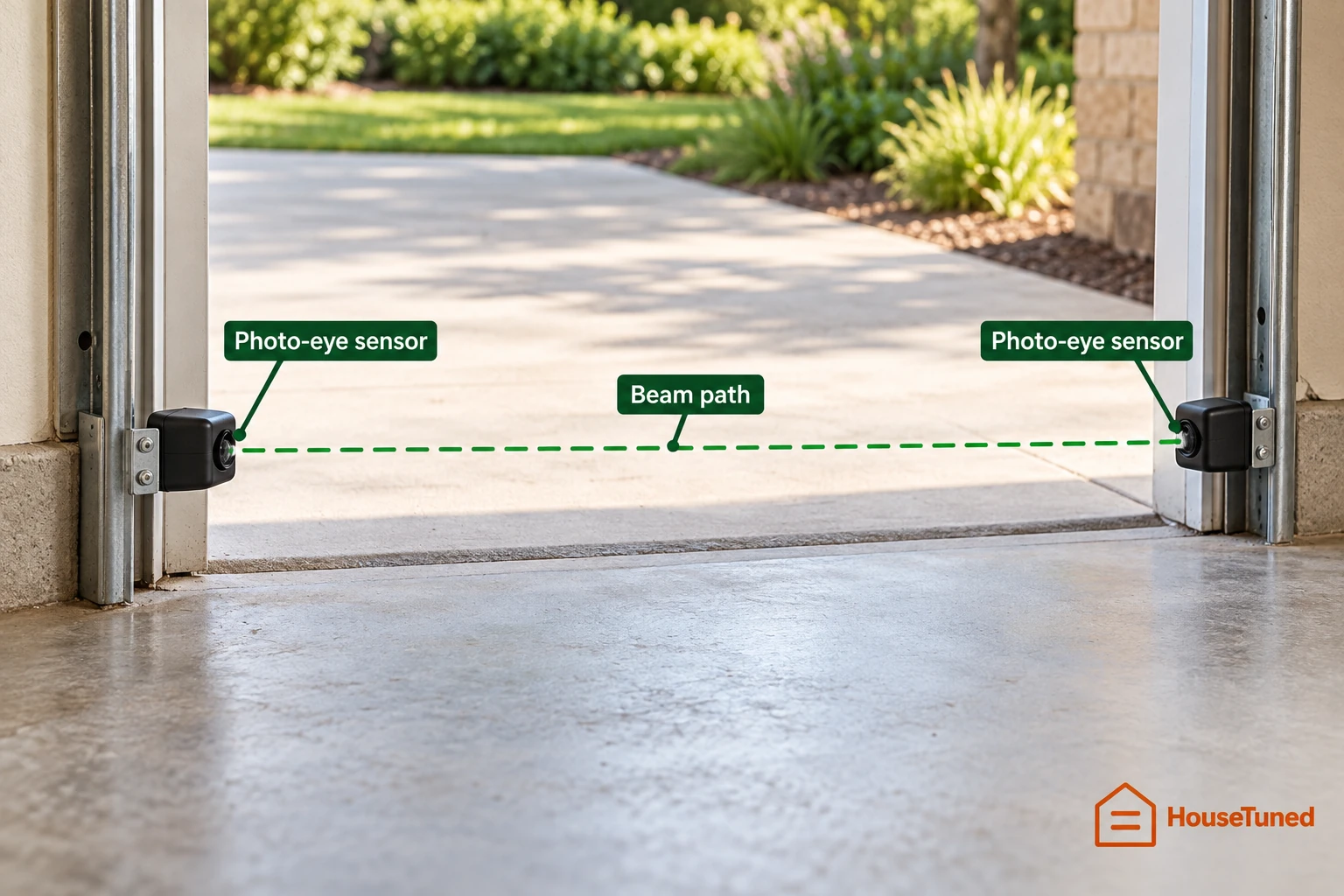
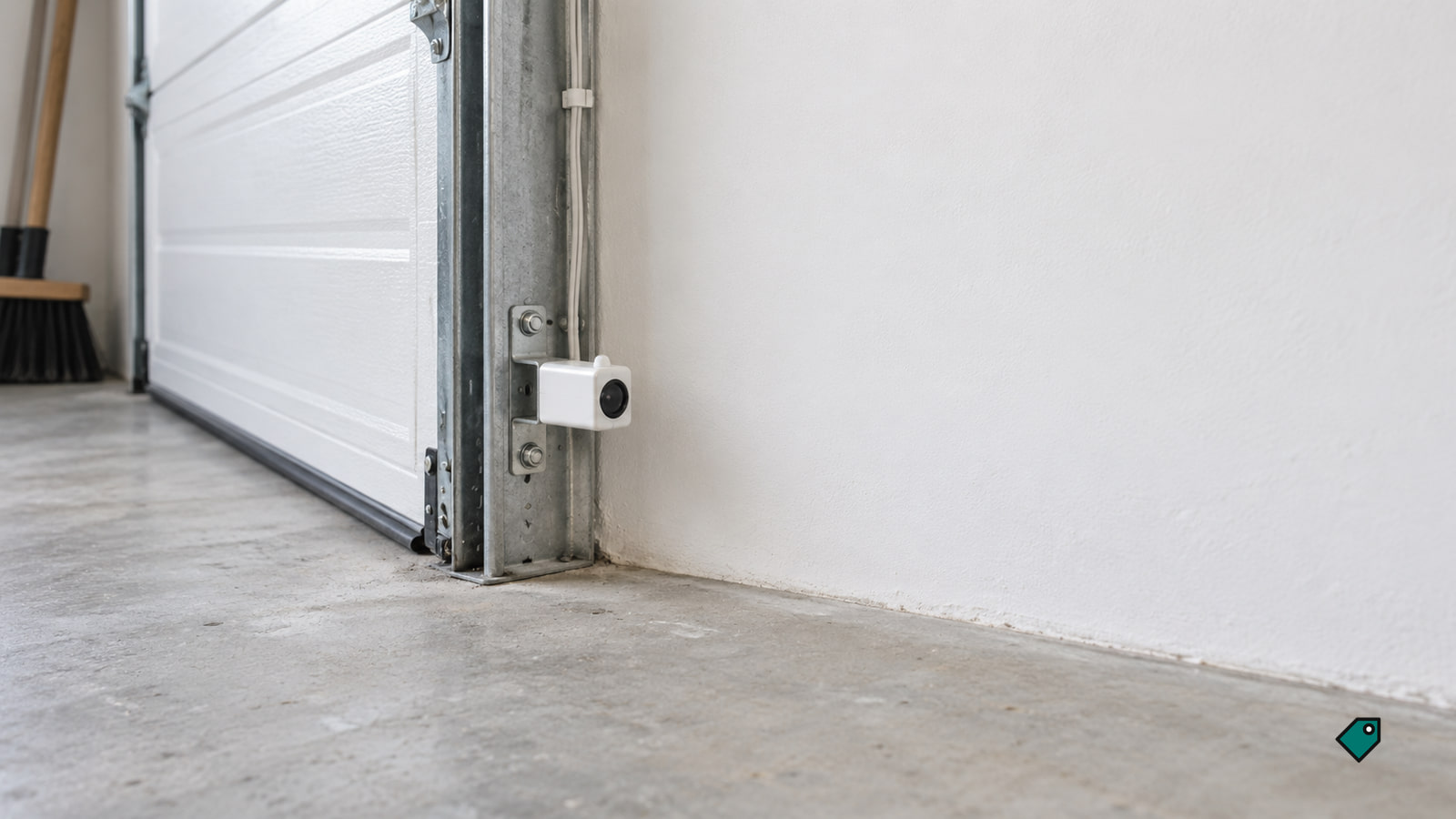
Clear the beam and clean both lenses
Keep the door out of normal use while you check a closing or safety fault; run it only for the controlled tests below. Don't pull the emergency release while the door is open because a weak or broken spring could cause the door to drop. Keep everyone clear of the doorway. Tell anyone with a remote, keypad or the app not to run the door while you're working on it.
- From outside the door's path, remove storage, leaves, webs or hanging objects from the low beam and visible door path. Stay out from beneath a partly open door. If both lights become steady and a normal button press closes the door, continue to the reversal tests below. If a light still blinks or stays dark, clean the lenses.
- With the door still, wipe both lens faces gently with a soft, dry cloth. Dirt and webs can weaken the beam even when the opening looks clear. Look for two steady lights and try a normal close from a clear position. If the lights or closing remain abnormal, look for a shifted sensor bracket.
- Record each light as steady, blinking or dark and note any opener fault display.
One sensor has been knocked out of line
Try alignment when the receiving light stays dark or flickers after the beam and lenses are clear, and an intact bracket has visibly shifted. A loose mount lets the lenses drift apart. If the door is crooked or hanging, a spring or cable looks damaged, it binds or sticks, or it moves unexpectedly, stop using it.
- Confirm that both brackets are intact and reachable from the floor. Unplug the opener and disconnect an accessible backup-battery plug before touching a bracket; if the backup connection is behind a cover, leave the bracket alone. Keep the door still while the power is off.
- On a wing-nut sensor mount, loosen the receiving eye's wing nut, point its lens directly at the sending eye and tighten the nut fully. If the sending eye has shifted too, point it back toward the receiver and secure its mount. Restore power and look for the receiving light to hold steady.
- If the light is steady, try a normal close. If it flickers again when you release the mount, the bracket is unstable. If the light stays dark, continue to the power and visible-wire checks. After any successful adjustment, perform both reversal tests below.
Other adjustable mounts loosen at the sensor fastener; aim the lenses at each other and secure the mount when the receiving light is steady.
An orange, green or blinking light is showing
Steady matters more than color. Normal sensor lights stay steady.
A dark, dim or flickering receiver with a steady sender sends you back to the beam and aim, then along the receiving wire where you can see it. A cut, pinched or loose wire can mimic a bad sensor.
If both lights are dark while the opener should be awake, confirm that it's plugged in, see whether a wall switch controls its outlet, and look for a tripped breaker. Restored power should return steady lights and normal closing. A powered outlet with no response to the wired wall control points to an opener fault.
A light stays dark after cleaning and aiming
- With the door still, trace both visible sensor wires. If you find exposed conductors, a damaged run or a broken bracket, leave it for the repair visit. If an existing wire is loose at a low-voltage sensor terminal you can reach from the floor, turn off the opener before touching it.
- At a sensor terminal you can reach from the floor, put the loose existing wire back in the same terminal it came from, secure the terminal with its screw or clip, and tug gently to confirm the wire holds. Do not open a mains-voltage cover or change other connections.
- Restore power and look for the normal steady lights. Try a normal close, then perform the beam test below. If the light remains dark or the door still will not close, the installed wire, sensor pair or opener circuit needs diagnosis.
- After a garage-door technician confirms that the pair itself has failed, match a sender-and-receiver kit to the opener's model or parts diagram. Before removing the old eyes, unplug the opener and disconnect an accessible backup-battery plug; if that plug is behind a cover, stop without removing the old eyes. Remove the old eyes, mount the new pair with the kit hardware at the existing low beam height, no higher than 6 inches, and attach each wire using the kit's terminal diagram.
- Restore power and aim the eyes until their lights hold steady. Try a normal close and run both reversal tests below. If closing or reversal fails, stop using the opener.
The fault comes and goes
When closing fails only at certain times, note the time and whether direct sun reaches the receiving eye. Compare each eye's steady, blinking or dark state during a failure with its state after a successful close. Sun can interfere with the receiver even though the lenses and bracket have not moved.
After rain, look for dirt on the lenses and visible damage to the housings or wires. If the fault follows a bump, look for a loose bracket or a wire strained at its mount. A light that flickers again after cleaning and alignment points toward an unstable bracket, connection or sensor.
With adjacent garage doors, record which door is operated and whether the other pair's lights change. One sender can interfere with a neighboring receiver. Leave the sensor layout and mounting height intact while you gather that pattern.
After a successful close, repeat the beam test. If both lights stay steady and the door reverses when you break the beam, a later reversal points to another obstruction, binding or an opener travel fault. A door or opener that will not move despite responsive photo-eyes is a different fault.
Test the reversal and price the remaining repair
- From a position clear of the door, press the wall control normally and watch it close fully. If it will not start down, return to the lights, power and wiring results. If it closes, open it for the beam test.
- Start a normal close. While standing clear, pass a long-handled object through the low beam without putting any part of your body in the door's path. The moving door must stop and reverse fully open. If it does not, stop using the opener.
- With the door fully open, lay a 2-by-4 board flat on the floor in the center of its path. Close the door from a clear position. It must reverse when it contacts the board. Remove the board after the door opens. If it does not reverse, stop using the opener.
Repeat these checks about monthly, as the U.S. Consumer Product Safety Commission's opener safety guidance (opens in a new tab) directs.
A compatible sensor pair at $50 to $100 in parts plus one billed hour at $75 to $150 an hour builds an installed job of $130 to $250, including alignment and reversal testing. The Chamberlain 041-0136 kit is $33.99, and the Genie Safe-T-Beam kit is $45.89. With $75 in parts and one billed labor hour, that job comes to about $190.
| Job | Price | What it covers |
|---|---|---|
| Diagnosis and realignment, no parts | $75 to $150 | One billed hour to inspect, align and test intact photo-eyes. |
| Short low-voltage wire repair | $100 to $150 | A limited repair or short run; concealed wiring costs more. |
The price for diagnosis and realignment without parts includes 1 hour of labor.
Ask whether a separate service-call charge is added or credited toward that work. A damaged bracket, longer wire run or additional diagnostic time changes the job. If the pair and wiring test good but closing still fails, expect a sensor-circuit diagnosis in the same first-hour visit band; further opener parts are extra.
A parts warranty may cover a confirmed defective eye while leaving labor or the visit charge to you. Keep your purchase receipt.
If the door is crooked, binds, has damaged springs or cables, moves unexpectedly, fails either reversal test, or still will not close after these checks, stop owner troubleshooting and call a trained garage-door technician. Give them the door behavior, both lights' colors and states, any opener code, changes after your checks, and both reversal-test results. Mention sun, rain or an adjacent door if the fault is intermittent. A confirmed dead household outlet or mains-wiring fault belongs with a qualified electrician.
Questions about using and keeping the sensors working
Can I hold the wall button to close the door while the sensors are not working?
Some openers allow a temporary close only while you continuously hold the wired wall control. Keep the entire doorway visible and clear, stay at the control until the door is fully closed, and do not make this normal use. Never bypass or disconnect the photo-eyes; if either reversal test fails, keep the opener out of automatic service.
If one garage door sensor is bad, do I need to replace both?
No. A dark receiver can mean an obstruction, misalignment or a wiring fault, so rule those out first. If a sensor is confirmed bad, replacement kits commonly contain both eyes, and the parts price and installed quote cover the pair. Match the kit to your opener.
How do I keep the garage door sensors from failing again?
Keep storage, leaves and webs out of the low beam, wipe dirty lenses with a soft, dry cloth, and protect the brackets from bumps. Look for a newly loose mount or exposed wire, and repeat the beam-interruption test after an adjustment and about monthly. Recurring flicker after cleaning and alignment calls for bracket, wiring or sensor diagnosis.
More in this category